
New Brother MFC-J5010DW and MFC-J5110DW Business Inkjet Printers
Posted by Cartridge World on 22nd Jul 2026
Meet the Brother MFC-J5010DW and MFC-J5110DW
Two fast, business-focused colour inkjet printers designed to help small offices print, scan, copy and fax more efficiently.
Brother has expanded its business inkjet range with the new MFC-J5010DW and MFC-J5110DW multifunction colour printers.
Both models combine fast colour printing, automatic two-sided document handling, wireless connectivity and high-capacity paper trays. They are designed for busy home offices, small businesses and workgroups that need the flexibility of an inkjet printer without sacrificing speed or productivity.
The two machines share many of the same core features, but there are some important differences in paper capacity, touchscreen size and media handling. This guide explains what each printer offers and helps you decide which model is likely to be the better fit for your workplace.
At a glance: Choose the Brother MFC-J5010DW for a compact and capable everyday office printer. Choose the MFC-J5110DW when you need greater paper capacity, more flexible media handling and a larger touchscreen.
Fast colour printing for the modern office
The MFC-J5010DW and MFC-J5110DW can both print at speeds of up to 28 images per minute in black and 26 images per minute in colour. That is fast enough for everyday business documents, customer correspondence, reports, forms, presentations and marketing materials.
A first print time of approximately 4.7 seconds also means that short print jobs can be produced quickly without waiting for a lengthy warm-up process.
Both printers use Brother’s MAXIDRIVE inkjet technology. This technology is designed to deliver ink accurately and consistently, helping the printers produce sharp text, clear graphics and rich colour output at speed.
Brother MFC-J5010DW

The MFC-J5010DW is the more compact of the two printers. It offers the same headline print speeds as the larger model, together with a 250-sheet paper tray, single-sheet manual feed slot and 50-sheet automatic document feeder.
Its 6.8cm colour touchscreen provides straightforward access to printing, scanning, copying and fax functions without taking up unnecessary desk space.
- Up to 28ipm mono and 26ipm colour printing
- 250-sheet main paper tray
- Single-sheet manual feed slot
- 50-sheet two-sided automatic document feeder
- 6.8cm colour touchscreen
- Automatic duplex printing
- Wireless and mobile printing
Brother MFC-J5110DW
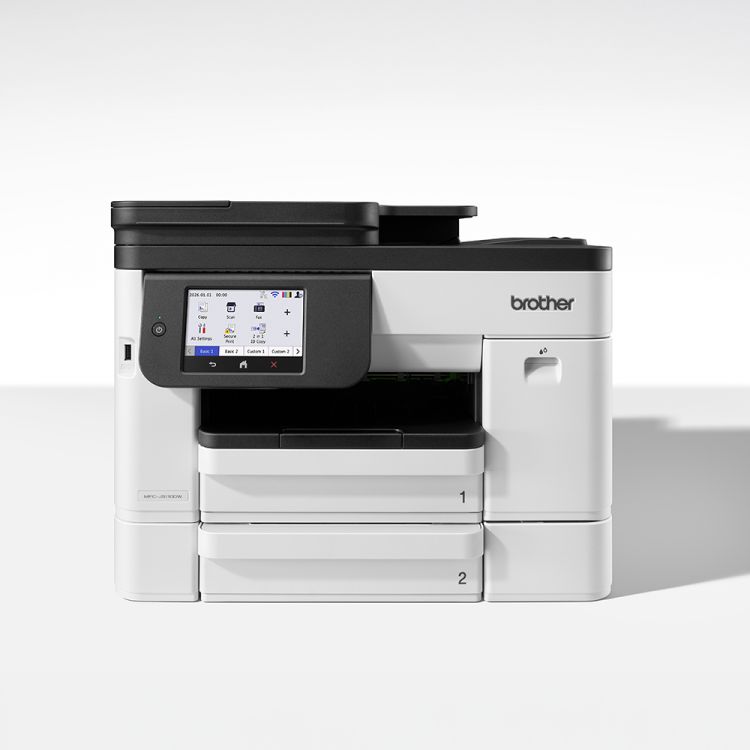
The MFC-J5110DW is designed for offices with heavier or more varied printing requirements. Its two 250-sheet paper trays provide a combined capacity of 500 sheets.
It also includes a 100-sheet multipurpose tray and a larger 10.9cm colour touchscreen, making it easier to switch between paper types and manage more demanding document workflows.
- Up to 28ipm mono and 26ipm colour printing
- Two 250-sheet paper trays
- 100-sheet multipurpose tray
- 50-sheet two-sided automatic document feeder
- 10.9cm colour touchscreen
- Automatic duplex printing
- Advanced business print support
Brother MFC-J5010DW vs MFC-J5110DW
The following comparison highlights the most important differences between the two printers.
Automatic two-sided scanning, copying and faxing
Both printers include a 50-sheet automatic document feeder capable of handling two-sided documents. This is particularly useful when scanning, copying or faxing contracts, reports, invoices and other multi-page paperwork.
Instead of manually turning each sheet over, the printer can process both sides of the document automatically. This saves time and makes either model a practical choice for businesses trying to reduce repetitive administrative work.
Reduce paper use with duplex printing
Automatic duplex printing is included on both machines. Printing on both sides of the page can reduce paper use and help create more professional-looking reports, handouts, manuals and customer documents.
Duplex printing is especially valuable in an office environment where even a modest reduction in paper consumption can produce meaningful savings over the life of the printer.
Wireless and mobile printing
The MFC-J5010DW and MFC-J5110DW support wireless printing and can be managed through the Brother Mobile Connect app.
Mobile connectivity allows users to print and scan from compatible smartphones and tablets, check printer information and access frequently used functions without always returning to a desktop computer.
Useful features for hybrid working
- Print documents directly from compatible mobile devices
- Scan paperwork into digital files
- Access commonly used printer functions through the app
- Check printer and ink information remotely
- Share one printer between several office users
High-quality pigment ink for business documents
Both printers use separate black, cyan, magenta and yellow pigment ink cartridges. Separate cartridges mean that you only need to replace the individual colour that has run out.
Brother’s pigment inks are intended to produce well-defined text and strong colour output, making them suitable for everyday office documents, invoices, correspondence, charts and presentations.
High-yield cartridge options are also available, helping businesses reduce how frequently cartridges need to be changed.
Advanced maintenance helps protect print quality
Brother has equipped both printers with its Advanced Maintenance technology. The printer monitors ink delivery and can identify when maintenance may be required.
Micro-vibration technology and a multi-port suction system are designed to help maintain a consistent ink flow, remove air bubbles and reduce the risk of ink drying within the printing system.
Which Brother printer should you choose?
Choose the MFC-J5010DW when:
- You need a fast multifunction printer for a smaller office
- A 250-sheet paper tray is sufficient
- Desk or shelf space is limited
- Most printing is completed on standard office paper
- You want the main productivity features at the lower purchase price
Choose the MFC-J5110DW when:
- Several people will regularly share the printer
- You want to hold up to 500 sheets in the main trays
- You frequently switch between different paper types
- A larger touchscreen would make daily use easier
- Your business handles longer or more frequent print runs
Shop the latest Brother business inkjet printers
Compare both models online and choose the paper capacity, touchscreen and document-handling features that best match your office.
Frequently asked questions
What is the main difference between the Brother MFC-J5010DW and MFC-J5110DW?
The MFC-J5110DW has two 250-sheet paper trays, a 100-sheet multipurpose tray and a larger 10.9cm touchscreen. The MFC-J5010DW has one 250-sheet tray, a single-sheet manual feed slot and a smaller 6.8cm touchscreen.
Do both Brother printers have the same print speed?
Yes. Both models offer print speeds of up to 28 images per minute in black and 26 images per minute in colour.
Can these printers automatically scan both sides of a document?
Yes. Both models include a 50-sheet automatic document feeder with support for two-sided document scanning.
Do the MFC-J5010DW and MFC-J5110DW print on both sides of the paper?
Yes. Both machines support automatic duplex printing, helping businesses reduce paper consumption.
Can I print from a phone or tablet?
Yes. Both printers support mobile printing and can be managed using the Brother Mobile Connect app on compatible devices.
Are these A3 printers?
No. The MFC-J5010DW and MFC-J5110DW are A4 multifunction printers designed primarily for standard office documents.
Are the printers covered by a warranty?
Both printers are supplied with a 12-month Brother warranty when the printer is registered in accordance with Brother’s warranty requirements.
Which model is better for a busy office?
The MFC-J5110DW is generally the stronger choice for a busy or shared office because it offers substantially more paper capacity, a multipurpose tray and a larger touchscreen.
Printer specifications and availability are correct at the time of publication and may be changed by the manufacturer. Print speeds are manufacturer figures and actual performance can vary according to document complexity, connection type, print settings and operating environment.