
Toner Cartridge — What’s Inside?
17th Sep 2026
What’s Inside a Toner Cartridge?
A toner cartridge may look fairly simple from the outside, but inside is a carefully engineered collection of rollers, blades, gears and electronic components all working together to produce a clean printed page.
If you have ever wondered what actually happens inside a laser printer cartridge, this guide takes a closer look. We have broken a typical toner cartridge down into its main components and explained what each part does, along with some of the print problems that can occur when those components wear or become damaged.
At a glance
- Toner cartridges contain far more than just toner powder.
- Rollers and blades control how toner is distributed onto the page.
- The photoconductor drum plays a key role in creating the printed image.
- Gears, seals and electronic contacts help the cartridge operate correctly.
- The exact construction varies between cartridge and printer designs.
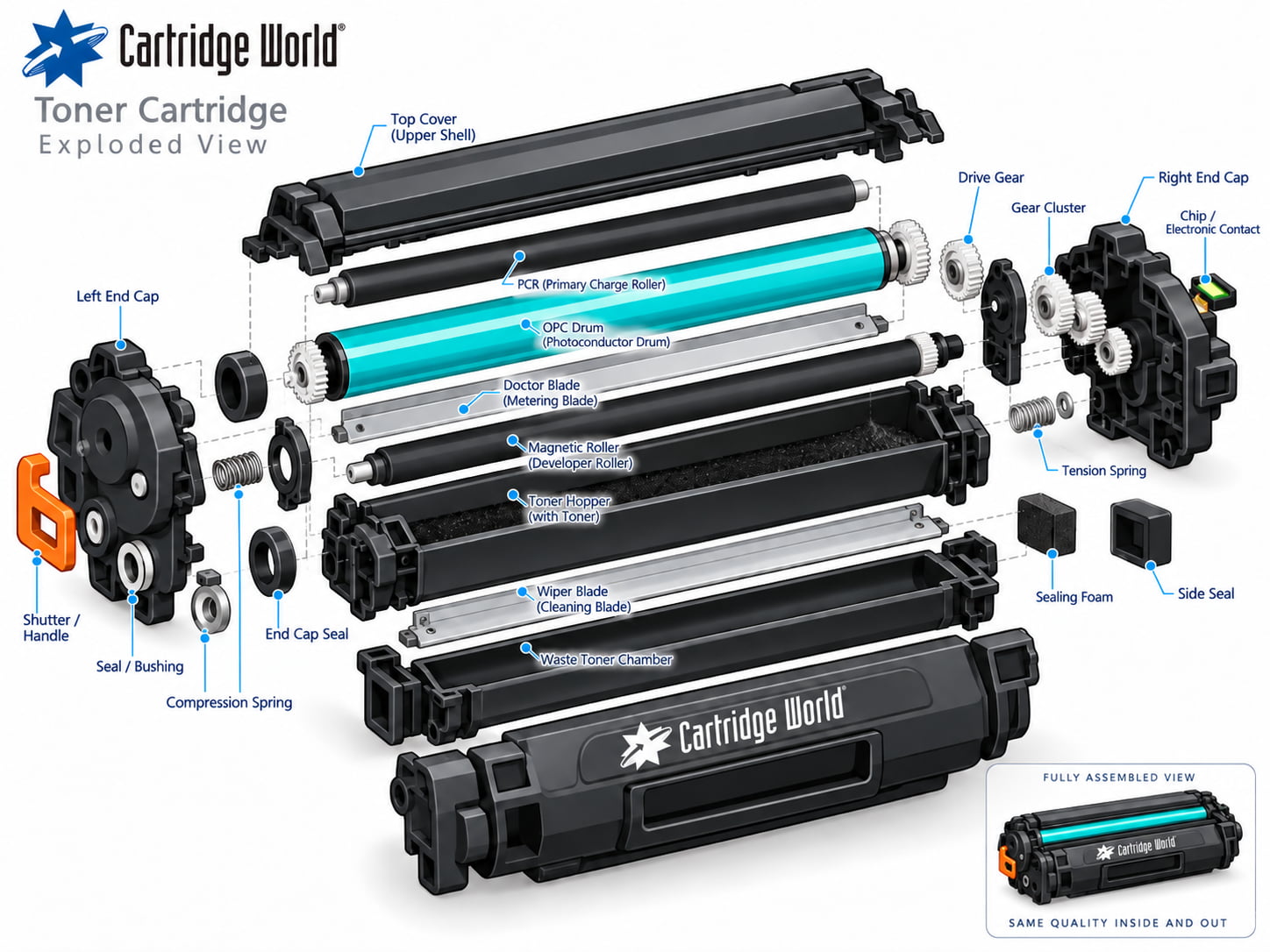
The main components inside a toner cartridge
Cartridge designs differ between manufacturers and printer models, so not every toner cartridge contains its components in exactly the same arrangement. However, many cartridges rely on the same basic principles.
Toner hopper
This is the main reservoir that holds the toner powder before it is transferred through the cartridge during printing.
Developer or magnetic roller
The developer roller carries a controlled layer of toner from the hopper towards the imaging system so it can be transferred where required.
Doctor blade
Despite its unusual name, the doctor blade performs an important job. It helps regulate the thickness and consistency of toner on the developer roller.
OPC drum
The Organic Photoconductor, or OPC drum, is the light-sensitive cylinder used to form the image that will eventually be transferred onto the paper.
Primary charge roller
Often shortened to PCR, this roller applies an electrical charge to the drum so that the laser imaging process can take place correctly.
Wiper blade
After a page has been printed, the wiper blade removes residual toner from the drum so it is ready for the next print cycle.
Waste toner chamber
Residual toner removed during the cleaning process may be collected in a waste toner section within the cartridge.
Drive gears
A series of precision gears connects the cartridge to the printer's drive mechanism and keeps the internal rollers rotating at the correct speed.
Chip and electronic contacts
Many modern toner cartridges include a chip or electrical contacts which communicate cartridge information to the printer.
Seals, springs and shutters
Smaller components help prevent toner leakage, maintain the correct pressure between rollers and protect sensitive parts while the cartridge is being handled.
How all the components work together
When you send a document to a laser printer, the printer creates an electrostatic image corresponding to the page being printed. Toner is distributed by the developer system and attracted to the appropriate areas of the imaging drum.
The toner image is then transferred from the imaging system onto the paper. The paper subsequently passes through the printer's fuser unit, where heat and pressure permanently bond the toner to the page.
What happens when one of these components develops a problem?
Because several components are involved in producing each page, different faults can result in different print-quality symptoms.
| Print symptom | Possible area to investigate |
|---|---|
| Vertical streaks or lines | Drum, developer roller, wiper blade or contamination |
| Faded or light printing | Toner supply, developer system or printer settings |
| Repeating marks | A rotating component such as the drum or roller |
| Grey background | Charge system, developer system, toner or drum |
| Toner leaking | Seals, cartridge body or waste toner chamber |
| Cartridge not recognised | Chip, electrical contacts or cartridge installation |
These symptoms do not automatically mean that the toner cartridge is responsible. Laser printers also contain components such as the fuser, transfer system and other imaging parts which can produce similar faults.
Is the toner cartridge the same as the drum?
Not always. Some printer designs combine the toner cartridge and imaging drum into a single replaceable cartridge. Others use a toner cartridge and a separate drum unit.
This is why two cartridges can look very different even though they perform broadly the same job. Always buy consumables using your exact printer model or cartridge reference rather than relying on appearance alone.
Need a replacement toner cartridge?
Find compatible and original toner cartridges for leading printer brands, with fast UK delivery and help available if you are unsure which cartridge you need.
Shop Toner Cartridges Get Cartridge HelpFrequently asked questions
What is actually inside toner?
Laser printer toner is a very fine powder formulated to create the printed image before being bonded to the paper by the printer's fuser. Its precise composition varies between toner formulations.
Does every toner cartridge contain a drum?
No. Some cartridges have an integrated imaging drum, while other printers use a separate drum or imaging unit.
Why does a toner cartridge contain a chip?
On many modern cartridges the chip allows information to be exchanged between the cartridge and printer, such as cartridge identification or supply information.
Can a damaged toner cartridge cause lines on the page?
Yes. Damage or contamination affecting components such as the drum, developer roller or cleaning system can result in streaks, lines or repeating marks. Similar symptoms can also originate elsewhere in the printer.
Can I open a toner cartridge myself?
We would not normally recommend dismantling a toner cartridge. Toner is extremely fine, internal components can be sensitive to damage and opening the cartridge can cause toner leakage.